Consent and message-type preferences
Many apps need to respect what a customer has agreed to receive - marketing messages, servicing alerts, payment reminders, and so on. Atomic gives you everything you need to implement message-type preferences cleanly:
- Store each customer's preferences as data on their profile.
- Gate sending so cards are only created for customers who have opted in.
- Show or hide cards and containers on the client where appropriate.
This pattern walks through each layer. You can adopt just the parts you need - storing and gating at send time is usually enough, with client-side hiding as further refinement.
1. Store preferences on the customer profile
Model each message type as a custom profile field. The most flexible approach is a single text field that holds the message types the customer has opted into, as comma-separated values. Text fields support multiple values, for example:
| Field | Example value |
|---|---|
consented_types | servicing, payments, marketing |
Alternatively, use one boolean-style field per type (for example consent_marketing = true/false) if you prefer explicit per-type flags. Either way:
- Set the field up under Configuration > Customer Profiles > Custom fields.
- Update it whenever the customer changes their choices, either via the Users API or by mapping the value from the customer's JWT.
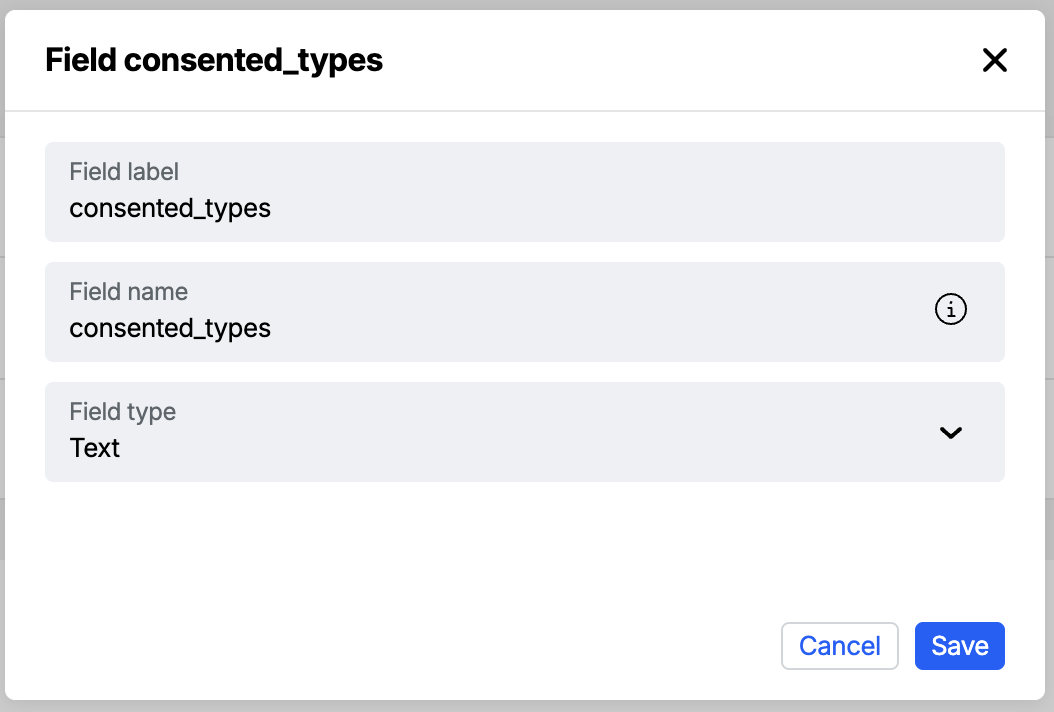
Custom profile fields describe what a customer wants to receive. They are separate from the user preferences API, which controls when push notifications may be delivered (quiet hours, time zone and a global notificationsEnabled switch). Use custom fields for message-type consent; use user preferences for push timing.
2. Gate sending so cards only go to opted-in customers
The most important layer is to avoid creating a card at all for a customer who has not consented. There are two complementary ways to do this in an Action Flow.
Option A: Trigger from a segment
Create a dynamic segment that filters on your consent field - for example "customers where consented_types contains marketing". Then trigger the Action Flow when a customer enters that segment, or use the segment to scope a send. Only customers who have consented are included.
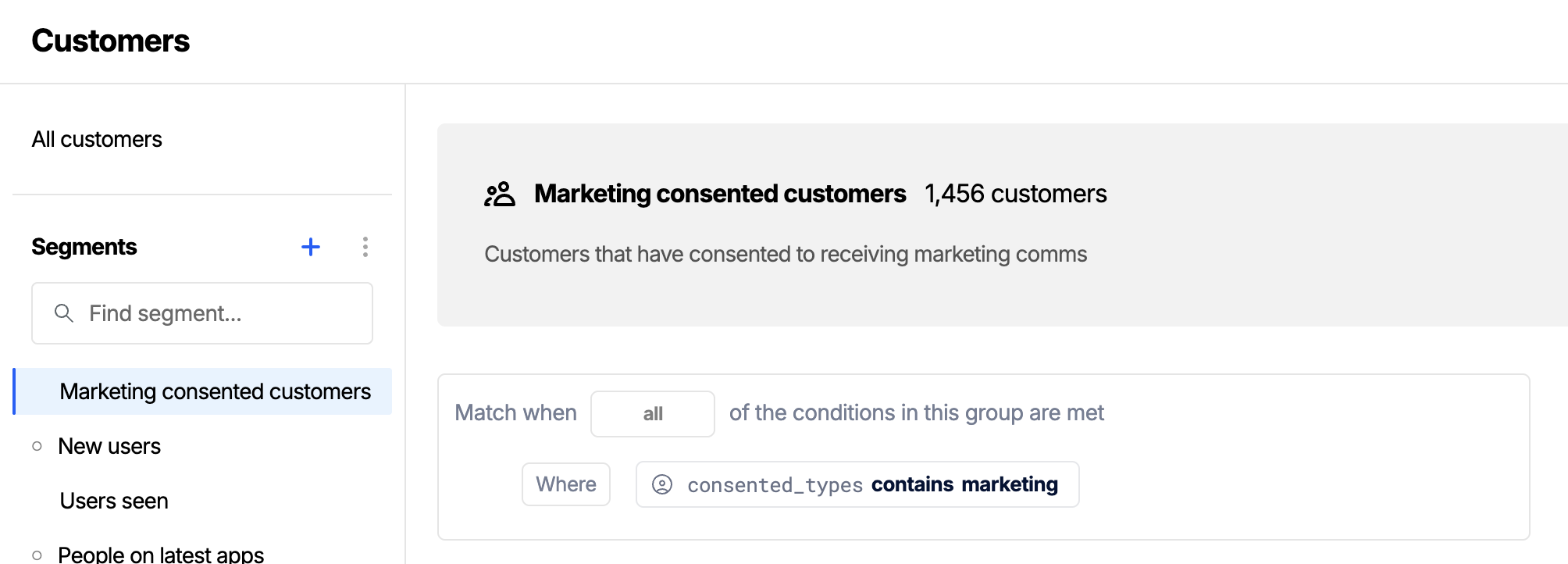
This is the cleanest option when an entire Action Flow is specific to one message type.
Option B: Branch inside the Action Flow
When a single Action Flow serves several message types, or when consent is one of several conditions, add a Branch flow step. The branch can read the customer's profile values from the Action Flow context and only continue to the Send a Card step when the relevant consent value is present.
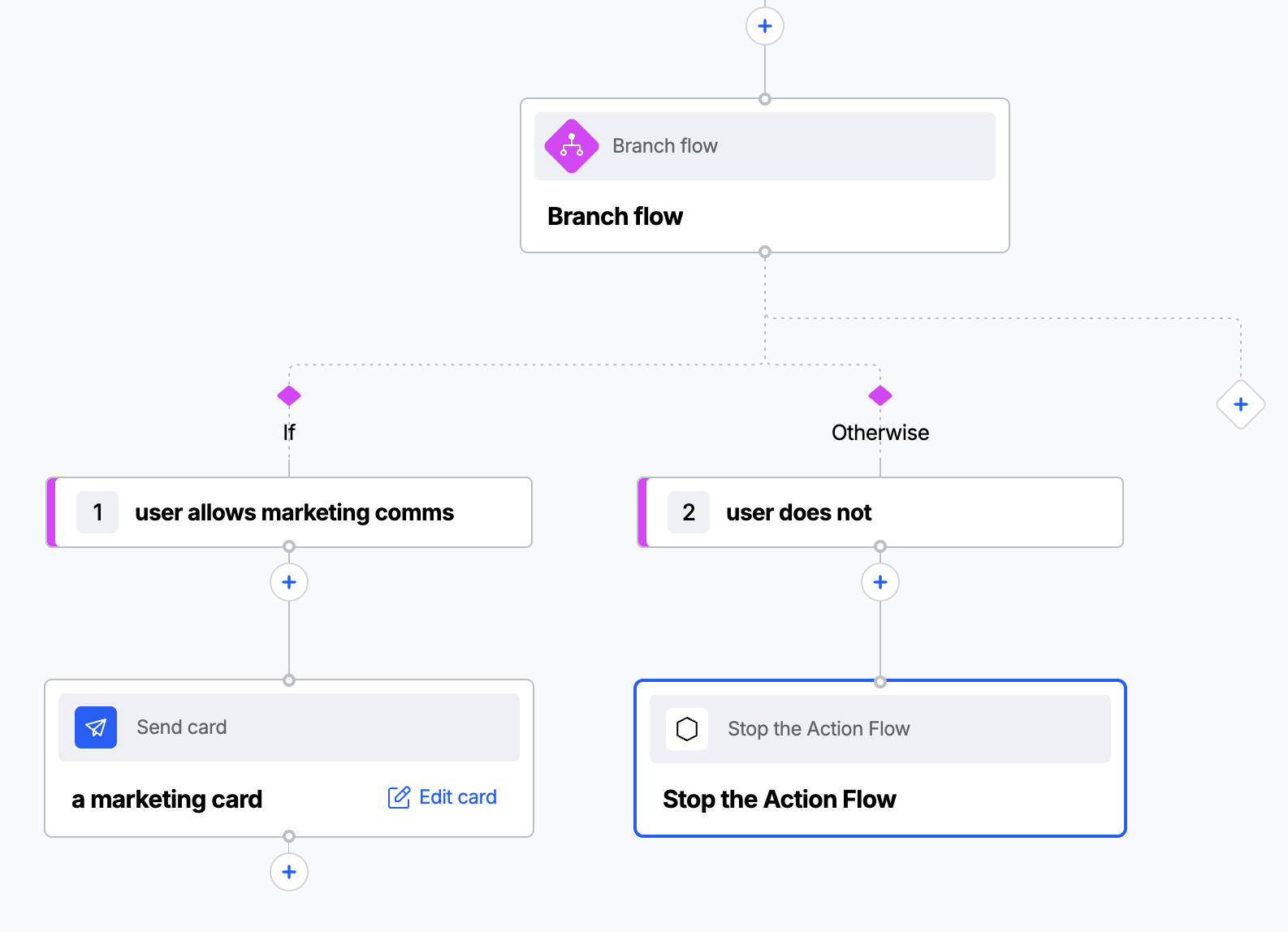
The logic in "user allows marketing comms" is as shown here:
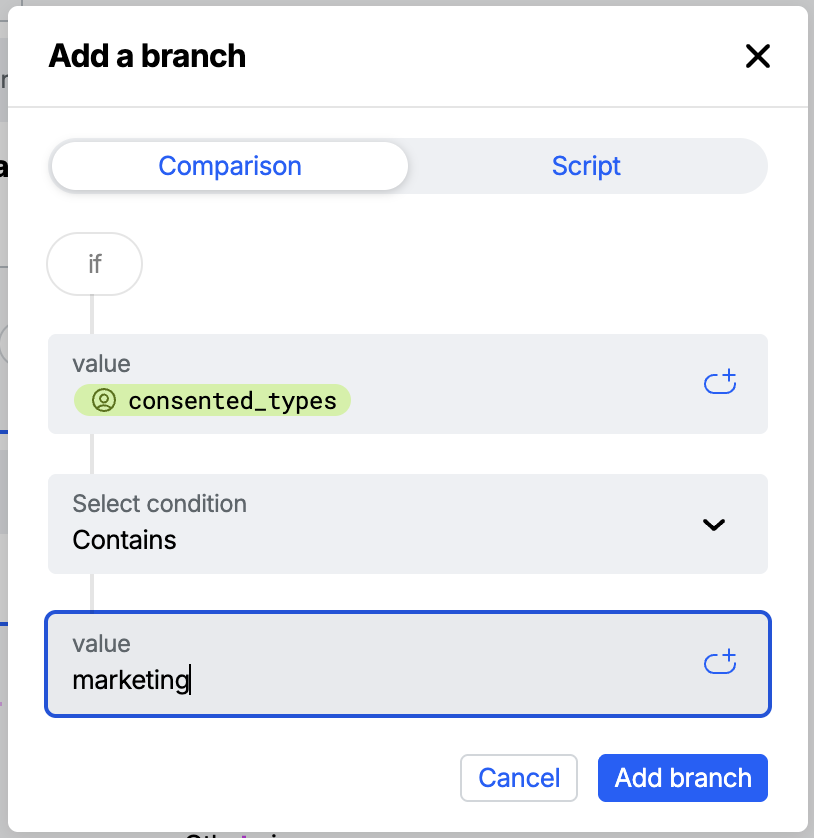
Gating at send time means non-consented customers never receive the content as a push notification or in-app message.
3. Show or hide cards and containers in the app
Send-time gating handles consent for new cards. You may also want the app to react to preferences directly: to immediately reflect a change the customer just made, or to hide a whole surface. There are two ways to do this; for customers with a set of distinct message types, prefer the first.
Option 1: Separate message types by stream and container
If your message types are well defined (i.e. marketing, servicing, and payments) give each category its own stream and its own stream container. You then map cards to a category simply by choosing which stream they go to, and you show or hide the matching container in the app based on the customer's preference.
This is the cleanest model for distinct message types, for a few reasons:
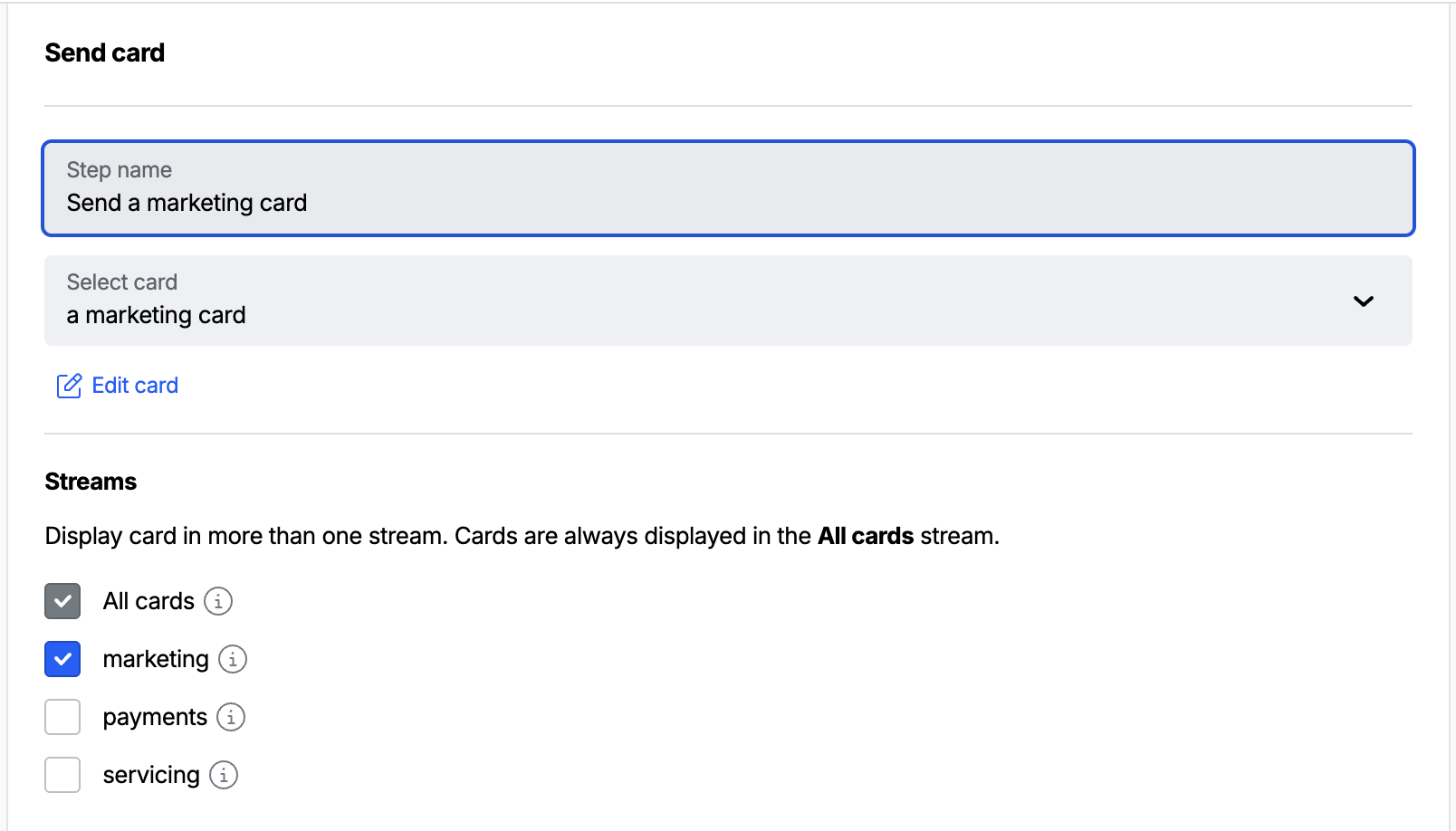
- Categorisation lives in the Workbench, card by card. When you configure a send a card step, you choose the stream the card belongs to in its delivery settings, this maps the card to its category. Different cards in the same Action Flow can target different streams, so one Action Flow can produce a marketing card and a servicing card and have each land in the right category. This is more precise than tagging cards with an Action Flow-level variable, which is scoped to the Action Flow rather than set per card.
- Showing and hiding is a single, coarse decision. Because a category maps to one container, honouring a preference is just a matter of whether you mount that container. There is no per-card filtering logic in the app.
To implement it:
- Create a stream per category (for example Marketing, Servicing, Payments) and a container that displays each one.
- In each Action Flow, target each card to the stream for its category via the card's delivery settings.
- In the app, embed each category's container on the relevant surface, and only render it when the customer has opted into that category. For example, do not mount the marketing container for a customer who has opted out of marketing.
For a category you are retiring for all customers, you can instead disable the container in the Workbench, which stops it serving cards without losing its configuration.
Stream separation pairs naturally with section 2: gate the Action Flow so cards for an opted-out category are never sent, and hide that category's container in the app so the surface is not shown empty.
Option 2: Filter individual cards within one container
If your categories are not distinct enough to warrant separate streams, or you want a single mixed surface that adapts to preferences, keep one container and filter its cards on the client by a custom variable.
Attach a message_type variable to cards when creating the card, then filter the container to the customer's chosen types when you embed it:
- iOS (SwiftUI)
- Android (Compose)
- Web
// Only show cards whose message_type the customer has opted into
let filters = [
    AACCardListFilter.filter(byCardsIn: [
        .byVariableName("message_type", string: "servicing"),
        .byVariableName("message_type", string: "payments")
    ])
]
var config = ContainerConfiguration()
config.filters = filters
StreamContainer(
    containerId: "<stream container id>",
    configuration: config
)
See Filtering cards (iOS) for the available values and operators.
// Only show cards whose message_type the customer has opted into
val servicing = AACCardFilterValue.byVariableName("message_type", "servicing")
val payments = AACCardFilterValue.byVariableName("message_type", "payments")
val filter = AACCardListFilter.contains(listOf(servicing, payments))

StreamContainer(
    containerId = "<stream container id>",
    configuration = StreamContainerConfiguration(
        filters = listOf(filter)
    )
)
See Filtering cards (Android Compose) for the available values and operators.
// Only show cards whose message_type the customer has opted into
instance.streamFilters.addVariableFilter("message_type").in(["servicing", "payments"])
instance.streamFilters.apply()
See Filtering cards (Web) for the available values and operators.
Client-side filters change what is displayed; the card still exists in the stream and is counted unless filtered out everywhere. For true consent enforcement, always combine filtering with send-time gating (section 2) so the card is never created for a non-consenting customer in the first place.
Putting it together
A typical end-to-end setup for a "marketing messages" preference:
- Add a
consented_typescustom profile field and keep it updated from your app or JWT. - Create a Marketing stream and a container that displays it, and target marketing cards to that stream via their delivery settings.
- Build marketing Action Flows that either trigger from a "consented to marketing" segment or branch on the consent value before sending.
- In the app, only mount the marketing container for customers who have opted into marketing.
This gives you authoritative enforcement at send time, clean per-category routing in the Workbench, and an app that reflects preference changes by simply showing or hiding the relevant container.