Building a card archive view
By design, an Action Card leaves its stream as soon as it reaches a closed state; completed, dismissed, expired or cancelled. That keeps a customer's live stream focused on what still needs their attention, but it also means there is no built-in "history" of the cards they have already dealt with.
Some apps want that history: a "Recently completed", "Activity" or "Archive" screen where a customer can look back over offers they accepted, reminders they cleared, or messages that have since expired. This pattern shows how to build one by keeping a dedicated archive container and sending a read-only version of each card to it, once the original card closes.
Example use-cases
- An "Activity" tab that lists offers a customer has accepted or declined, and reminders that have expired.
- A servicing app that keeps a record of alerts a customer has actioned, so they can refer back to what they did and when.
- A loyalty app where completed reward cards move into a "Claimed rewards" archive rather than disappearing.
The pattern at a glance
- Create a dedicated archive stream and container that your live stream never sends to. This is the surface your app will present as the archive view.
- Design a read-only archive card template - a simple summary card, with no actions to complete or dismiss, that represents the closed original.
- Archive on close. When a card reaches a closed state, send a copy of it to the archive stream. You can do this either from a single dedicated archive Action Flow that reacts to card completed, dismissed, cancelled, and/or expired events across your environment, or inline within each Action Flow that you want to archive.
The original card and its archive copy are two separate cards in two separate streams. The live card behaves exactly as before; the archive copy is what persists in the archive view after the original closes.
Step 1: Create the archive stream and container
Create a new stream (for example, Archive) and a new stream container bound to it. This container is the one you will embed on your app's archive or activity screen.
A few settings are worth considering for an archive specifically:
- Card limit. A container has a card limit (default 50). Set this to however many recent items you want the archive to hold - the oldest cards drop off once the limit is reached.
- Theme. You may want a distinct, more muted theme for the archive so it reads as historical rather than actionable.
Keep the two sides separate: your live cards should never be assigned to the archive stream, and your archive cards should never be assigned to a live stream. Because a card is always added to the All cards stream, point your archive container at your dedicated archive stream rather than All cards, so it shows only archived copies.
Step 2: Design the archive card template
Create a card template to represent an archived item. This is an ordinary card template, but because it only ever needs to be read, keep it simple:
- No completion or dismissal actions that the customer needs to take - the archive card is a record, not a task. Avoid submit buttons and interactive subviews.
- Disable all menu actions. Turn off the card's overflow-menu and swipe actions - snooze, dismiss, and voting (thumbs up/down) - so a customer cannot act on an archived card and inadvertently close it. This keeps the archive view genuinely read-only.
- Summarise the original. Use variables to carry across whatever identifies the original card: for example its title, a short description, the outcome ("Completed", "Expired"), and the date it closed. You will populate these in Step 3.
- Optionally set an expiry so archived items age out after a period (for example, 90 days) instead of living forever. Combined with the container's card limit, this keeps the archive bounded.
Step 3: Archive a card when it closes
There are two ways to send the archive copy. Pick whichever fits how your Action Flows are organized.
Option A: A dedicated archive Action Flow
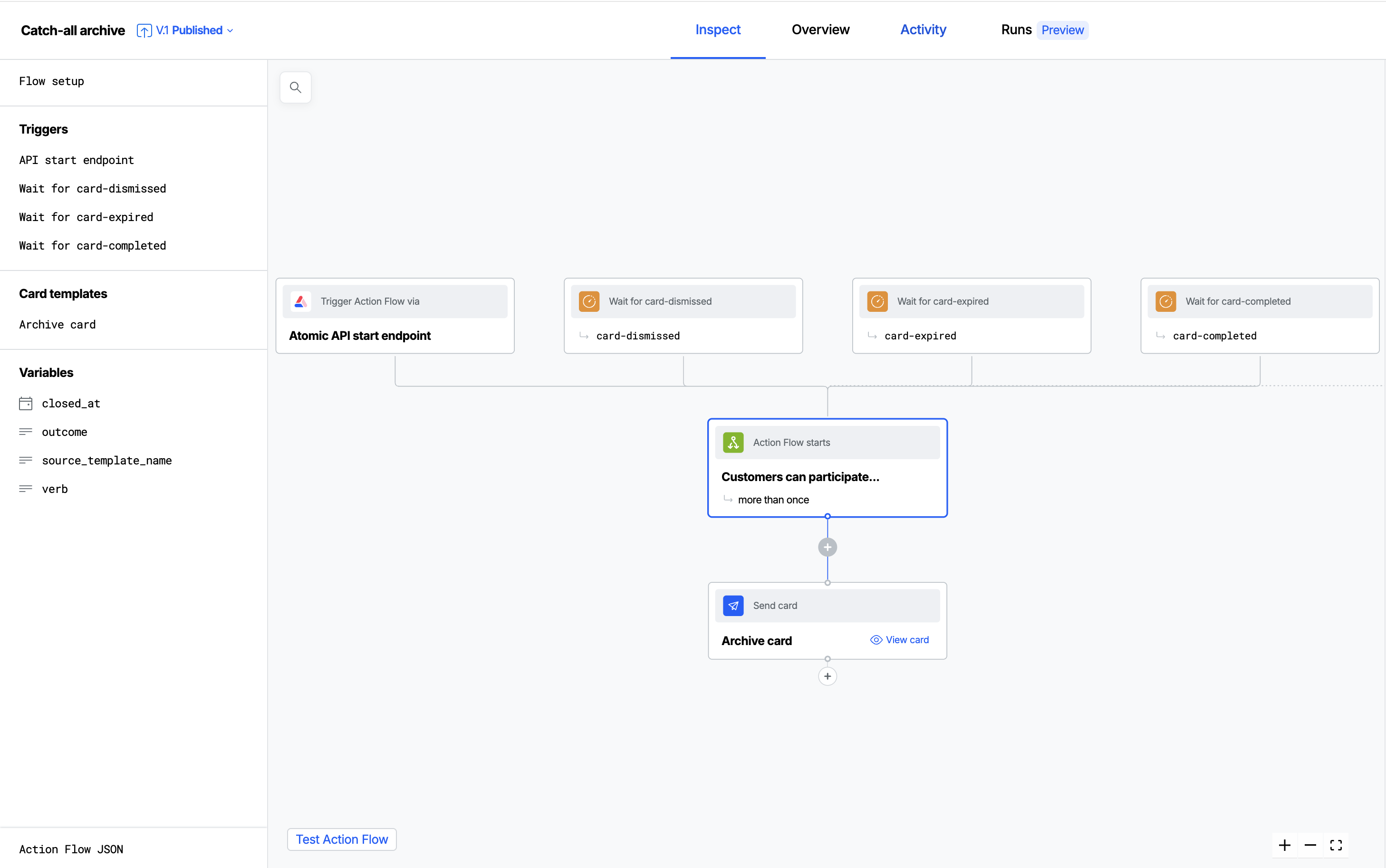
Build one Action Flow whose job is to archive any card that closes, anywhere in your environment. This keeps all archiving logic in one place and captures every closing state uniformly.
-
Add event triggers for the card-close analytics events you want to archive, this may vary based on your usage of Atomic. For example:
card-completedcard-dismissedcard-expiredcard-cancelled- you may wish to omit cancelled cards as they have potentially been intentionally recalled and not intended to be seen by the customer.
-
Declare an Action Flow variable for each value your event mapping will write into. The mapping can only populate variables that already exist on the Action Flow, so before you write the mapping, add:
outcome(string) - the raw close event, e.g.card-completedverb(string) - a friendly label for how the card closed, e.g. "completed"closed_at(date) - when the card closedsource_template_name(string) - the name of the original card's template
Add any variables you carry across from the original card (via
platformContext.eventDetail) here too, so the archive card template can reference them. -
On each trigger, use Edit event mapping to pull the details you need out of the event and into those variables. The card-close event carries the customer (
endUserId), the source card's template details (cardContext), and the values the original card was created with (platformContext.eventDetail). For example:// The exact shape is shown in the sample payload beside the mapping editor -// use it to confirm these paths for your events.return {targetUserIds: [event.endUserId],variables: {outcome: event.analyticsEvent, // e.g. "card-completed"closed_at: event.timestamp,verb: 'completed', // for use in the archive template - statically set per listenersource_template_name: event.cardContext.cardTemplateName,// carry across the original card's own variables:...event.platformContext.eventDetail}} -
Add a Send a card step that creates your archive card template, and set its delivery to the archive stream from Step 1. Reference the variables you declared (for example
%{source_template_name}and%{verb}) in the card's content so each archived copy reflects the original and how it closed.
Because this approach identifies the original card by its cardTemplateName, that name is surfaced to customers in the archive view. Make sure your card templates have sensible, customer-friendly names you are comfortable showing.
Note that this approach is significantly less configurable per-card than Option B: every closed card is archived through the same generic archive template, so you cannot tailor the archived copy to a particular card. If you need each card to control what its archived record looks like, use Option B.
Your archive cards are cards too. If one expires, or the customer dismisses it, that emits a card-expired or card-dismissed event. Atomic automatically prevents an Action Flow's own events from re-triggering it, so you cannnot enter an archiving loop.
Here is the full configuration for an archive Action Flow built this way - three event listeners (card-completed, card-dismissed and card-expired), each setting a static verb for the archive card, all feeding a single Send a card step that targets the archive stream:
To try it yourself, copy this JSON and paste it into a new Action Flow: in the Action Flow editor, click Action Flow JSON in the bottom-left, then paste the configuration in. Remember to update the target streams on the send-card steps to point at your own archive stream before publishing.
Example archive Action Flow (JSON)
{
  "type": "card",
  "steps": {
    "_start": {
      "id": "_start",
      "next": [
        "create_card_PvR6j"
      ],
      "type": "start"
    },
    "create_card_PvR6j": {
      "id": "create_card_PvR6j",
      "name": "Send archive card",
      "type": "create-card",
      "properties": {
        "output": {
          "type": "default"
        },
        "cardOptions": {
          "priority": 5,
          "targetStreamIds": [
            "20ZJk40n"
          ]
        },
        "cardTemplateId": "card_QeWbE"
      }
    }
  },
  "version": "4",
  "triggers": {
    "LjgQfwfMUPdYjBxjzDNFZ": {
      "id": "LjgQfwfMUPdYjBxjzDNFZ",
      "name": "Wait for card-dismissed",
      "type": "event-listener",
      "properties": {
        "mapping": {
          "type": "script",
          "script": "return {\n  targetUserIds: [event.endUserId],\n  variables: {\n    outcome: event.analyticsEvent, // e.g. \"card-completed\"\n    closed_at: event.timestamp,\n    verb: 'dismissed',\n    source_template_name: event.cardContext.cardTemplateName,\n    // carry across the original card's own variables:\n    ...event.platformContext.eventDetail\n  }\n}",
          "variables": {
            "path": "event.properties",
            "type": "path"
          },
          "targetUserIds": {
            "path": "event.endUserId",
            "type": "path"
          }
        },
        "condition": {
          "type": "generic",
          "eventNames": [
            "card-dismissed"
          ]
        }
      }
    },
    "NhoU4n6as71Hlcb8SymJ-": {
      "id": "NhoU4n6as71Hlcb8SymJ-",
      "name": "Wait for card-expired",
      "type": "event-listener",
      "properties": {
        "mapping": {
          "type": "script",
          "script": "return {\n  targetUserIds: [event.endUserId],\n  variables: {\n    outcome: event.analyticsEvent, // e.g. \"card-completed\"\n    closed_at: event.timestamp,\n    verb: 'expired',\n    source_template_name: event.cardContext.cardTemplateName,\n    // carry across the original card's own variables:\n    ...event.platformContext.eventDetail\n  }\n}",
          "variables": {
            "path": "event.properties",
            "type": "path"
          },
          "targetUserIds": {
            "path": "event.endUserId",
            "type": "path"
          }
        },
        "condition": {
          "type": "generic",
          "eventNames": [
            "card-expired"
          ]
        }
      }
    },
    "lVasaN_fne-evbLQsevox": {
      "id": "lVasaN_fne-evbLQsevox",
      "name": "Wait for card-completed",
      "type": "event-listener",
      "properties": {
        "mapping": {
          "type": "script",
          "script": "return {\n  targetUserIds: [event.endUserId],\n  variables: {\n    outcome: event.analyticsEvent, // e.g. \"card-completed\"\n    verb: 'completed',\n    closed_at: event.timestamp,\n    source_template_name: event.cardContext.cardTemplateName,\n    // carry across the original card's own variables:\n    ...event.platformContext.eventDetail\n  }\n}",
          "variables": {
            "path": "event.properties",
            "type": "path"
          },
          "targetUserIds": {
            "path": "event.endUserId",
            "type": "path"
          }
        },
        "condition": {
          "type": "generic",
          "eventNames": [
            "card-completed"
          ]
        }
      }
    }
  },
  "variables": {
    "verb": {
      "type": "string"
    },
    "outcome": {
      "type": "string"
    },
    "closed_at": {
      "type": "date",
      "format": {
        "type": "date",
        "format": "MMMM d, yyyy - h:mmaa"
      }
    },
    "source_template_name": {
      "type": "string"
    }
  },
  "cardTemplates": {
    "card_QeWbE": {
      "actions": {
        "snooze": {
          "swipe": {
            "enabled": false
          },
          "overflow": {
            "enabled": false
          }
        },
        "voteUp": {
          "feedback": {
            "enabled": false
          },
          "overflow": {
            "enabled": false
          }
        },
        "dismiss": {
          "swipe": {
            "enabled": false
          },
          "overflow": {
            "enabled": false
          }
        },
        "voteDown": {
          "feedback": {
            "enabled": false
          },
          "overflow": {
            "enabled": false
          }
        }
      },
      "subviews": {},
      "defaultView": {
        "actions": [],
        "content": [
          {
            "key": "headline_nO50R",
            "type": "headline",
            "attributes": {
              "text": "Card \"%{source_template_name}\" was %{verb}"
            },
            "respectArraysInResolution": true
          },
          {
            "key": "text_NGVKY",
            "type": "text",
            "attributes": {
              "text": "At %{closed_at}"
            },
            "respectArraysInResolution": true
          }
        ]
      },
      "metadata": {
        "cardName": "Archive card"
      }
    }
  }
}
Option B: Archive inline, within an Action Flow
If you only want to archive cards from specific Action Flows, do it inside those Action Flows instead of building a central one. This keeps a card's archiving inline to where it is sent, provides maximum customization of the archive card, and avoids the need for an environment-wide trigger (Option A).
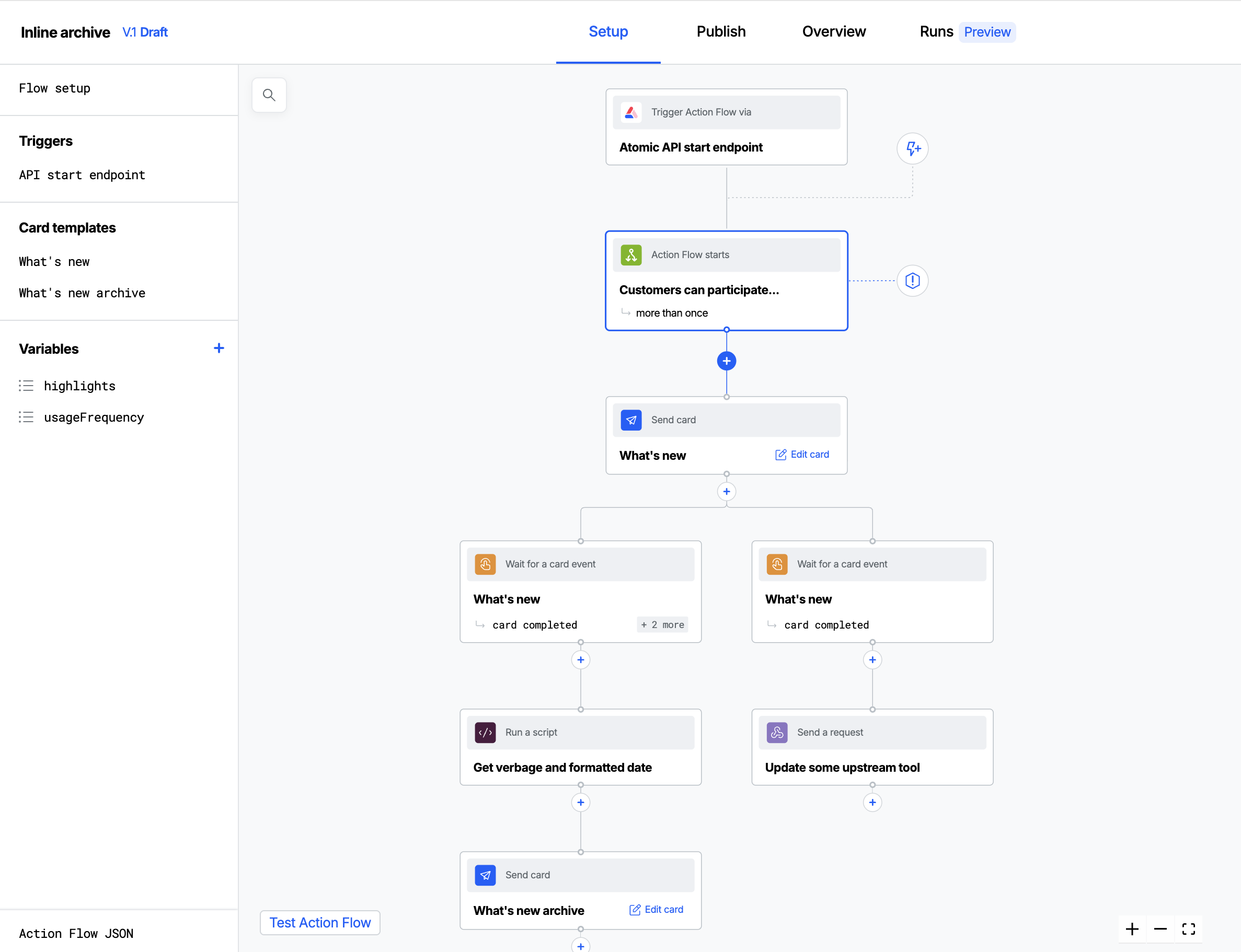
After the Send a card step that sends the live card, add a Wait for a card event step that listens for the card closing (for example, completed or dismissed). When it fires, follow it with a second Send a card step that sends the archive copy to the archive stream.
Because a customer flows through all possible branches, you can add a separate Wait for a card event step per outcome off the same live-card step - one waiting for completed, one for dismissed, and so on - and give each its own archive Send a card step. That lets each archived copy record exactly how the original closed or branch off in to different logic.
The original card's variables are already in context at this point, so the archive Send a card step can reuse them directly to render its summary. No event mapping is needed.
The example below sends a "What's new" announcement card, then listens for it closing. One Wait for a card event step (listening for card-completed, card-dismissed and card-expired) runs a Run a script step to derive the verb and a formatted date from the close event, and feeds a purpose-built "What's new archive" card. A second listener branches off card-completed to update an upstream tool, showing how inline archiving can sit alongside whatever other logic an Action Flow needs.
To try it yourself, copy this JSON and paste it into a new Action Flow via Action Flow JSON in the bottom-left of the editor. Remember to update the target streams on the send-card steps to point at your own live and archive streams before publishing.
Example inline-archiving Action Flow (JSON)
{
  "type": "card",
  "steps": {
    "_start": {
      "id": "_start",
      "next": [
        "create-card_sAmPl"
      ],
      "type": "start"
    },
    "script_BXvBb": {
      "id": "script_BXvBb",
      "name": "Get verbage and formatted date",
      "next": [
        "create_card_ethAk"
      ],
      "type": "script",
      "properties": {
        "output": {
          "script": "const eventName = context.flowSteps.card_event_listener_NSc0v.output.event.eventName\nconst timestamp = context.flowSteps.card_event_listener_NSc0v.output.event.timestamp\nreturn {\n    verb: eventName.split('-')[1],\n    formattedDate: new Date(timestamp).toString()\n}"
        }
      }
    },
    "create-card_sAmPl": {
      "id": "create-card_sAmPl",
      "name": "Send announcement",
      "next": [
        "card_event_listener_NSc0v",
        "card_event_listener_1DQ3z"
      ],
      "type": "create-card",
      "properties": {
        "output": {
          "type": "default"
        },
        "cardOptions": {
          "priority": 5,
          "targetStreamIds": [
            "G7ABolm1"
          ]
        },
        "cardTemplateId": "card_sAmPl"
      }
    },
    "create_card_ethAk": {
      "id": "create_card_ethAk",
      "name": "Send archive card",
      "type": "create-card",
      "properties": {
        "output": {
          "type": "default"
        },
        "cardOptions": {
          "priority": 5,
          "targetStreamIds": [
            "20ZJk40n"
          ]
        },
        "cardTemplateId": "card_TRdU6"
      }
    },
    "send_request_KMt18": {
      "id": "send_request_KMt18",
      "name": "Update some upstream tool",
      "type": "send-request",
      "properties": {
        "output": {
          "url": {
            "type": "static",
            "value": "https://example.org"
          },
          "type": "simple",
          "requestMethod": {
            "type": "static",
            "value": "POST"
          },
          "requestTimeout": {
            "type": "static",
            "value": 10000
          },
          "acceptableResponseCodes": {
            "type": "static",
            "value": [
              "2xx",
              "3xx",
              "4xx",
              "5xx"
            ]
          }
        }
      }
    },
    "card_event_listener_1DQ3z": {
      "id": "card_event_listener_1DQ3z",
      "name": "Card listener",
      "next": [
        "send_request_KMt18"
      ],
      "type": "event-listener",
      "properties": {
        "mapping": {},
        "condition": {
          "type": "card",
          "eventNames": [
            "card-completed"
          ],
          "sourceStepIds": [
            "create-card_sAmPl"
          ]
        }
      }
    },
    "card_event_listener_NSc0v": {
      "id": "card_event_listener_NSc0v",
      "name": "Card listener",
      "next": [
        "script_BXvBb"
      ],
      "type": "event-listener",
      "properties": {
        "mapping": {},
        "condition": {
          "type": "card",
          "eventNames": [
            "card-completed",
            "card-dismissed",
            "card-expired"
          ],
          "sourceStepIds": [
            "create-card_sAmPl"
          ]
        }
      }
    }
  },
  "version": "4",
  "metadata": {
    "payloadSamples": {
      "step": {},
      "connector": {}
    }
  },
  "triggers": {},
  "variables": {
    "highlights": {
      "type": "list",
      "default": [
        {
          "title": "Faster load times across all pages",
          "value": "speed"
        },
        {
          "title": "New dark mode support on mobile",
          "value": "darkmode"
        },
        {
          "title": "Improved search with filters",
          "value": "search"
        },
        {
          "title": "Bug fixes and stability improvements",
          "value": "bugs"
        }
      ]
    },
    "usageFrequency": {
      "type": "list",
      "default": [
        {
          "title": "Daily",
          "value": "daily"
        },
        {
          "title": "Weekly",
          "value": "weekly"
        },
        {
          "title": "Monthly",
          "value": "monthly"
        },
        {
          "title": "Rarely",
          "value": "rarely"
        }
      ]
    }
  },
  "cardTemplates": {
    "card_TRdU6": {
      "actions": {
        "snooze": {
          "swipe": {
            "enabled": true
          },
          "overflow": {
            "enabled": true
          }
        },
        "voteUp": {
          "overflow": {
            "enabled": true
          }
        },
        "dismiss": {
          "swipe": {
            "enabled": true
          },
          "overflow": {
            "enabled": true
          }
        },
        "voteDown": {
          "overflow": {
            "enabled": true
          }
        }
      },
      "subviews": {},
      "defaultView": {
        "actions": [],
        "content": [
          {
            "key": "headline_sAmP5",
            "type": "headline",
            "attributes": {
              "text": "What's new this month"
            }
          },
          {
            "key": "text_sAmP6",
            "type": "text",
            "attributes": {
              "text": "Here's a **quick summary** of the latest improvements we've shipped based on your feedback. _Thank you_ for helping us improve."
            }
          },
          {
            "key": "list_sAmP7",
            "type": "list",
            "attributes": {
              "type": "bullet",
              "source": "highlights"
            }
          },
          {
            "key": "text_sAmP8",
            "type": "text",
            "attributes": {
              "text": "These changes are live for all users."
            }
          }
        ]
      },
      "contextMapping": {
        "verb_P2OY": {
          "type": "context",
          "display": "verb",
          "mapping": {
            "path": "context.flowSteps['script_BXvBb'].output.verb",
            "type": "path"
          },
          "markdown": true,
          "sourceStepId": "script_BXvBb"
        },
        "formatteddate_OIXj": {
          "type": "context",
          "display": "formattedDate",
          "mapping": {
            "path": "context.flowSteps['script_BXvBb'].output.formattedDate",
            "type": "path"
          },
          "markdown": true,
          "sourceStepId": "script_BXvBb"
        }
      },
      "metadata": {
        "cardName": "What's new archive",
        "cardDescription": "Product update announcement",
        "cardDescriptionSubText": "This card was %{verb_P2OY} at %{formatteddate_OIXj}",
        "cardDescriptionElementsOrder": [
          "subText",
          "text"
        ]
      }
    },
    "card_sAmPl": {
      "actions": {
        "snooze": {
          "swipe": {
            "enabled": true
          },
          "overflow": {
            "enabled": true
          }
        },
        "voteUp": {
          "overflow": {
            "enabled": true
          }
        },
        "dismiss": {
          "swipe": {
            "enabled": true
          },
          "overflow": {
            "enabled": true
          }
        },
        "voteDown": {
          "overflow": {
            "enabled": true
          }
        }
      },
      "subviews": {
        "sAmP_feedback": {
          "title": "Share your feedback",
          "inputs": [
            {
              "key": "text_sAmP1",
              "type": "text",
              "attributes": {
                "text": "We read every response. Let us know what you think."
              }
            },
            {
              "key": "textInput_sAmP2",
              "type": "textInput",
              "attributes": {
                "name": "feedback",
                "format": "block",
                "placeholder": "What would you like to see next?",
                "numberOfLines": 3
              }
            },
            {
              "key": "dropdown_sAmP3",
              "type": "dropdown",
              "attributes": {
                "name": "usageFrequency",
                "label": "How often do you use our product?",
                "format": "inline",
                "source": "usageFrequency",
                "placeholder": "Select frequency"
              }
            }
          ],
          "actions": [
            {
              "key": "submitButton_sAmP4",
              "type": "submitButton",
              "attributes": {
                "name": "sendFeedback",
                "text": "Send feedback",
                "values": {},
                "appearance": "primary",
                "responseDefinition": ""
              }
            }
          ]
        }
      },
      "defaultView": {
        "actions": [
          {
            "key": "submitButton_SLOBa",
            "type": "submitButton",
            "attributes": {
              "icon": "smile",
              "name": "submitButton_cizdx",
              "text": "Got it",
              "values": {},
              "appearance": "primary",
              "responseDefinition": ""
            },
            "respectArraysInResolution": true
          },
          {
            "key": "linkButton_sAmPA",
            "type": "linkButton",
            "attributes": {
              "icon": "edit",
              "name": "openFeedback",
              "text": "Share your feedback",
              "layoutId": "sAmP_feedback",
              "appearance": "secondary"
            }
          }
        ],
        "content": [
          {
            "key": "headline_sAmP5",
            "type": "headline",
            "attributes": {
              "text": "What's new this month"
            }
          },
          {
            "key": "text_sAmP6",
            "type": "text",
            "attributes": {
              "text": "Here's a **quick summary** of the latest improvements we've shipped based on your feedback. _Thank you_ for helping us improve."
            }
          },
          {
            "key": "list_sAmP7",
            "type": "list",
            "attributes": {
              "type": "bullet",
              "source": "highlights"
            }
          },
          {
            "key": "text_sAmP8",
            "type": "text",
            "attributes": {
              "text": "These changes are live for all users."
            }
          }
        ]
      },
      "metadata": {
        "cardName": "What's new",
        "cardDescription": "Product update announcement"
      }
    }
  }
}
Use Option A when you want everything archived consistently and maintained in one place, including expiry and cancellation. Use Option B when only some Action Flows need an archive, or when you want each Action Flow to decide for itself what a closed card's archive record looks like.
Step 4: Show the archive in your app
The archive container is an ordinary stream container. Embed it wherever your archive or activity screen lives, using the archive container's ID:
- iOS (SwiftUI)
- Android (Compose)
- Web
StreamContainer(containerId: "<archive container id>")
StreamContainer(
    containerId = "<archive container id>"
)
AtomicSDK.embed(document.querySelector("#archive"), {
  streamContainerId: "<archive container id>",
  authToken: "<authToken>",
});
Because archive cards are designed to be read-only, the archive view behaves like a static list the customer can scroll through. You can use the card count APIs to badge the archive with how many items it holds.