Ask Atomic
Ask Atomic is in beta and may be subject to change. Please contact us to provide feedback.
Ask Atomic is the AI assistant built into the Workbench. It answers questions about Atomic, points you to the right part of the documentation, and can navigate you to the right place in the Workbench so you can spend less time hunting through menus and more time building.
Example use-cases
- Learn how Atomic works. Ask conceptual questions like "What's the difference between a stream and a stream container?" or "How do I trigger an Action Flow from a webhook?" and get answers grounded in the Atomic documentation.
- Find the right part of the Workbench. Ask "Take me to the analytics debugger" or "Where do I manage my API keys?" and Ask Atomic will offer to navigate you straight there.
- Get oriented as a new team member. Use the starter prompts to walk through Atomic 101 topics like setting up the SDKs or how Action Flows work.
- Look up answers without leaving the Workbench. Skip switching tabs to search the docs - ask in the sidebar and keep your place in the Workbench.
- Ask about whatever you have open. With an Action Flow step or a theme on screen, ask "what does this do?" or "what's wrong with this?" without naming it first.
How to use Ask Atomic
- Click the Ask Atomic button in the top-right corner of the Workbench. The chat sidebar opens on the right.
- Type your question into the Ask us something about Atomic... input at the bottom, or pick one of the starter prompts under categories like Get started or Action Flows & Cards.
- Press send. Ask Atomic streams its response in the chat, and may include results from a documentation search or other actions.
- If Ask Atomic wants to run an action (for example, navigating you to a page, or reading part of your configuration), you'll see an Action requested prompt with Allow and Deny buttons. Nothing happens until you choose. To stop being asked for that action every time, open the ... menu on the prompt and pick Always allow or Always deny.
- To start a fresh conversation, click the + button in the chat header. To revisit an earlier chat, open the menu at the top-left of the chat header. It's labeled Ask Atomic until a conversation has been given a title, after which it shows the title of the chat you're in.
- Close the sidebar at any time by clicking the x in the chat header, or by clicking the Ask Atomic button again.
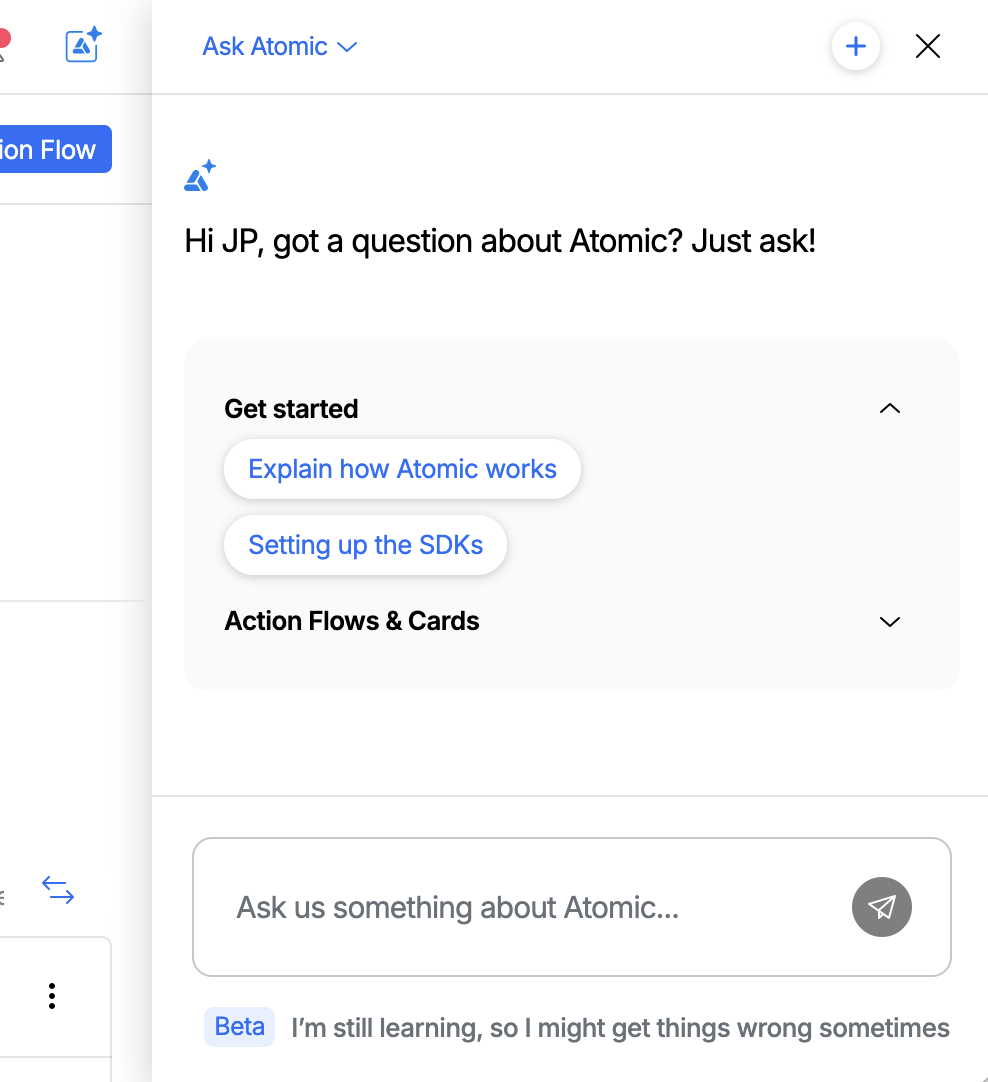
Open Ask Atomic from the top-right of the Workbench to start a chat.
Giving feedback on a response
Each response from Ask Atomic has feedback controls in the bottom-right corner:
- Thumbs up if the response was helpful.
- Thumbs down if it wasn't.
- Add feedback to leave a free-text comment with more detail.
Your feedback helps us improve the assistant - the more you share, the better Ask Atomic gets at answering your team's questions.
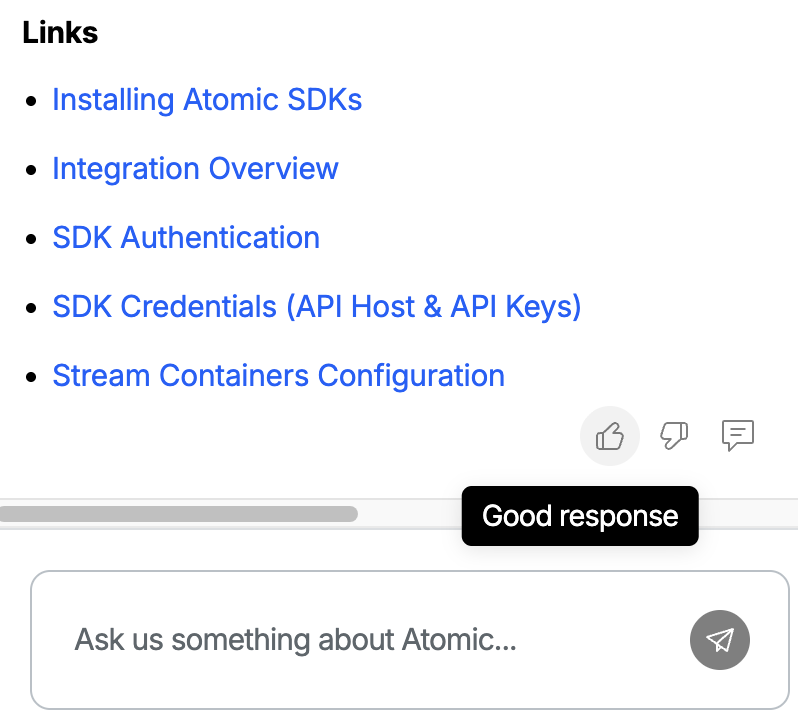
Use the feedback buttons to let us know how Ask Atomic is doing.
Asking about what you have open
Ask Atomic knows which part of the Workbench you're in, so you can say "this" instead of naming the thing you're looking at. Open an Action Flow and ask "what does this step do?", or open a theme and ask "do my colors provide enough contrast?", and it knows what you mean.
The chat shows your environment, because every answer is scoped to the environment you're in, and what you currently have open, down to the specific step or card you're editing in an Action Flow.
Ask Atomic is only told which resource you have open, never its contents. If answering needs more detail about what you have open, it asks your permission to read it first, the same as any other action. A question the documentation can answer, like "what are these?", is answered without reading anything of yours.
If the resource isn't what you meant, click the x to remove it. Ask Atomic then stops using it and will ask you which resource you mean. Starting a new chat brings dismissed resources back.
Settings
Click the cog in the chat header to open Ask Atomic's settings, and the speech bubble in the same place to go back to your chat.
Always allowed tools
Ask Atomic asks you before it runs a tool that sends configuration data to the AI processing, or takes action on your behalf. Every tool that can ask is listed here, so you can decide which ones it should stop asking about.
- Turn a tool on to always allow it. Ask Atomic runs it without asking you again.
- Turn a tool off to go back to being asked each time.
- A tool you picked Always deny for in a chat is marked Denied. Ask Atomic refuses that tool without asking until you turn it back on.
Tools that only read reference material never ask for approval, and are not listed, because they don't touch your environment or your customers. These are the documentation search, the current date and time, the list of Workbench pages Ask Atomic can navigate to, and the glossary that explains theme properties.
Reasoning
Ask Atomic works through a problem before it answers. Turn Show thinking on to see that thinking in the chat, which can help you judge how it reached an answer. Turning it off only hides it from view.
What you have open
Turn Share what I have open off to stop Ask Atomic being told which resource you're viewing. When talking to Ask Atomic, you'll need to name the resources you're referring to. This is your own setting, not an environment-wide one, so turning it off only affects your chats.
Turning Ask Atomic on or off
Ask Atomic is available in every environment by default. An environment admin can disable it from Configuration > System > AI features. When off, the Ask Atomic button and chat sidebar are hidden for everyone in that environment.
Privacy and data handling
Ask Atomic is powered by foundation models hosted on Amazon Bedrock, invoked from Atomic's own AWS account. This means:
- Your prompts and responses are not used to train models. Amazon Bedrock does not use inputs to or outputs from the service to train Amazon's base models or any third-party models, and does not share them with the model providers.
- Bedrock does not retain your prompts or responses. AWS does not store user inputs or model outputs from Bedrock inference calls.
- Your data stays in AWS. Content processed by Bedrock is encrypted in transit and is processed within the AWS Region where Atomic invokes the service - it is not sent to external AI providers' infrastructure.
- No third-party AI vendor in the loop. Because Atomic calls Bedrock from its own AWS account, your conversations are not exposed to an external AI vendor outside AWS.
- Chats are scoped to your account. Conversation history is saved per environment and is private to the team member who created it.
Security
- User-scoped permissions. Any action Ask Atomic takes, and any data it reads, runs with your Workbench user's permissions. Ask Atomic can never see or do anything outside the permissions you already have in the Workbench yourself.
- Approval before anything touches your environment. When Ask Atomic wants to run an action, it shows an Allow/Deny prompt and does nothing until you choose. You can decide to always allow a particular tool, either from the prompt itself or from settings, which skips the prompt for that tool from then on. Tools that only read reference material never prompt at all. As the assistant gains the ability to take more impactful actions over time, this approval step will still apply to anything that modifies your environment.
FAQs
What can Ask Atomic actually do?
Ask Atomic answers questions about Atomic by searching the documentation, and can navigate you around the Workbench. It can also read parts of your own environment to answer questions about your setup, including your Action Flows, segments, custom events, stream containers, notification platforms, themes, analytics, and individual customer profiles. It can change an Action Flow draft, check it, and submit it for approval, and change theme properties. It asks before each of these, and you can see the full list in settings. We're adding more capabilities over time as the beta progresses.
Does Ask Atomic ever change my configuration?
Not without your approval. Ask Atomic can update theme properties, change the configuration of an Action Flow draft, and submit a draft for approval, and it asks you before each change. A draft it submits counts as submitted by you. It doesn't change environment settings or send cards on your behalf. We do plan to expand what Ask Atomic can do over time.
Does Ask Atomic send what I'm looking at to the AI?
It's told which resource you have open, as an identifier, so it can work out what "this" refers to. The contents are only sent if answering needs them, and it asks your permission first. You can stop it being told at all with Share what I have open in settings.
Where does Ask Atomic get its answers?
Ask Atomic is grounded in the Atomic documentation. If a question goes beyond what the documentation covers, it will tell you rather than guess.
Are my chats saved?
Yes. Your recent conversations are saved per environment so you can return to them later. Open the chat history menu at the top-left of the chat header.
Can my whole team use it?
Anyone with access to the Workbench can use Ask Atomic. Each team member's chat history is private to their own account.
Can I turn Ask Atomic off?
Yes. An environment admin can disable Ask Atomic per environment from **Configuration > System > AI features. When it's off, the assistant is hidden for everyone working in that environment.
Why didn't Ask Atomic do what I asked?
Because the assistant is in beta, there are still gaps in what it understands and what actions it can take. If something doesn't work the way you expected, please use the Add feedback button on the response so we can investigate.
How do I report a problem or suggest an improvement?
Use the feedback buttons on any response, or reach out to us directly.